Knock down the turkeys, practice the overhand throw
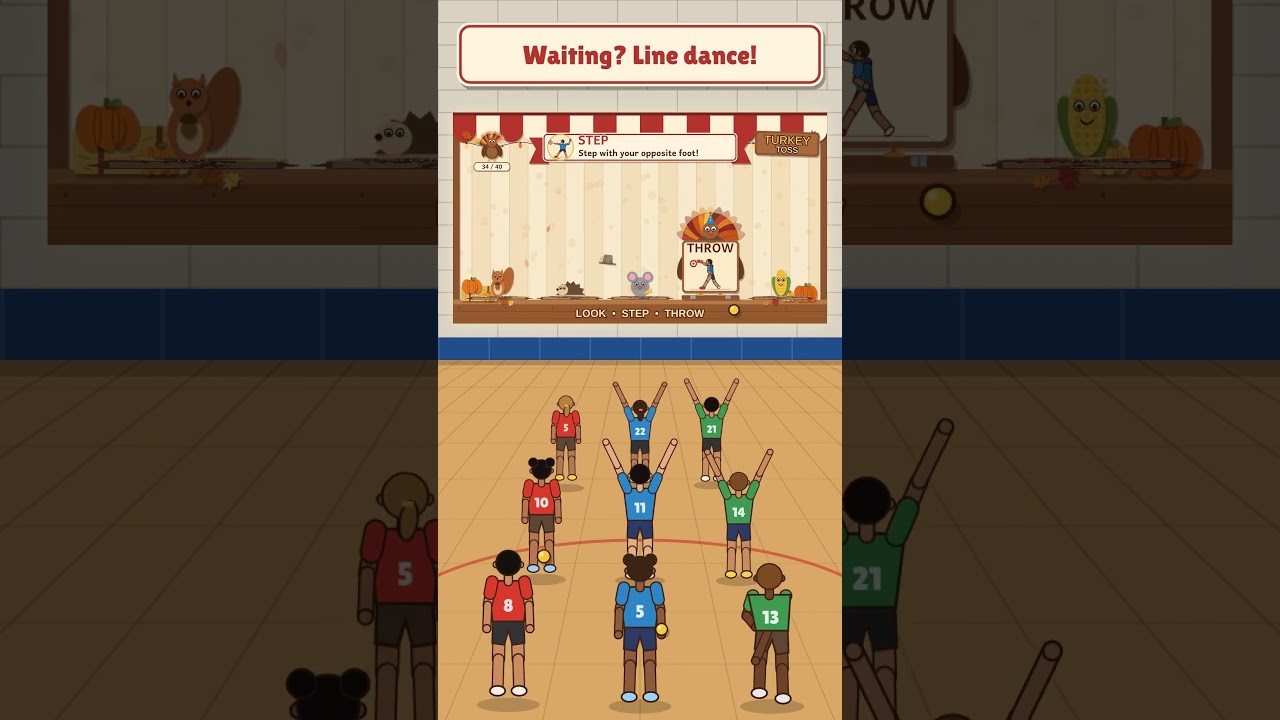
Five friendly turkeys stand in a carnival booth on your gym wall: LOOK, BACK, STEP, THROW and FINISH. Each turkey holds a picture of that part of the overhand throw, so kids see good technique every time they aim. Hit one and it flips back on its hinge with a deep thud, its hat flies off, and a surprise pops up from behind it. Built for kindergarten and first grade.
Learning target: I can look at my target and step with my opposite foot.
How to play
- Relay style: make 3 team lines with one ball per line. The front student throws, then jogs to the back. Students waiting their turn line dance.
- Pick one teaching cue per round. The matching turkey glows and its cue shows across the top, like “Step with your opposite foot!” Students can still hit any turkey that’s standing.
- Surprises: a mouse, squirrel, chick, pie, owl, corn cob or hedgehog hides behind every turkey. Sometimes it’s a golden egg worth bonus feathers.
- Class turkey: every hit adds a feather to the class turkey in the corner. Fill it together (40, 60, 80 or 100 feathers) and it does a silly dance.
- Knock them all down and the whole class does the Turkey Victory Dance. Then the turkeys pop back up. There’s no timer, so students practice at their own pace.
The five throwing cues
- LOOK: Look at your target.
- BACK: Arm way back.
- STEP: Step with your opposite foot.
- THROW: Throw to your target.
- FINISH: Follow through to your opposite knee.
The pictures show a child from behind, so students copy them without having to flip them in their heads. The ball and the stepping foot’s shoe are both red, which ties the throwing hand to the opposite foot. Switch the demo to left-handed and the pictures flip so the right foot steps.
Turkey Victory Dance (8 counts)
- 1–2 Wings out: flap your elbows twice.
- 3–4 Side to side: step right, then left.
- 5–6 Step and throw: opposite foot forward, follow through with empty hands.
- 7–8 Feathers up: hands spread overhead… FREEZE!
Students stay in their team lines and follow the dancing turkey, which faces the class like a mirror. In the menu you can play the dance after every board, every 2nd or 3rd board, or turn it off.
Setup tips
- Laptop and built-in webcam 15 to 20 feet from the wall, with the webcam facing the projection.
- Set the camera view from the menu: drag the four handles onto the four pink corners. If you already set up Math Blitz 5000 on this computer, Turkey Toss starts with that setup.
- Keep some lights on so the camera can see the balls.
- Sensitivity around 7 is a good starting point.
- Only the turkeys count, so students moving below them won’t knock any down. Each turkey scores once.
- 3 big turkeys mode makes the targets larger for younger throwers.
Keys
| Key | What it does |
|---|---|
| 1 to 5 | Change the teaching cue |
| B | Bonus feather for great effort or form. The game measures accuracy, not technique, so you decide when good form earns one. |
| R | Stand the turkeys back up |
| T | 5 turkeys or 3 big turkeys |
| H | Right-handed or left-handed demo |
| V | Play the Victory Dance |
| P | Menu and pause |
| K | Set camera view |
| [ and ] | Lower or raise sensitivity |
| M | Mute |
| O | Full screen |
What you need: a projector, a laptop or Chromebook with Chrome or Edge and a webcam, and soft balls (one per team line). It’s a single file you open in the browser, with nothing to install. No camera? Click or tap the turkeys to play.
Part of the PlayWithMotion 5000 series by Project Play PE.