Turn your climbing wall into a reaction game
A projector aimed at your climbing wall lights up one hold at a time. The climber touches the glowing hold, it bursts with light, and the light jumps to the next hold within reach. Fast touches build a streak and the colors heat up. The webcam watches the climber’s hands, so there’s nothing to wear and nothing to install on the wall.
Learning target: I can move with control from hold to hold and keep three points of contact.
Setup (one time per wall)
- Calibrate: click Auto Calibrate. The projector flashes 4 dots and the webcam finds them. If a dot isn’t found, use Manual Calibrate and click the 4 dots in the camera view.
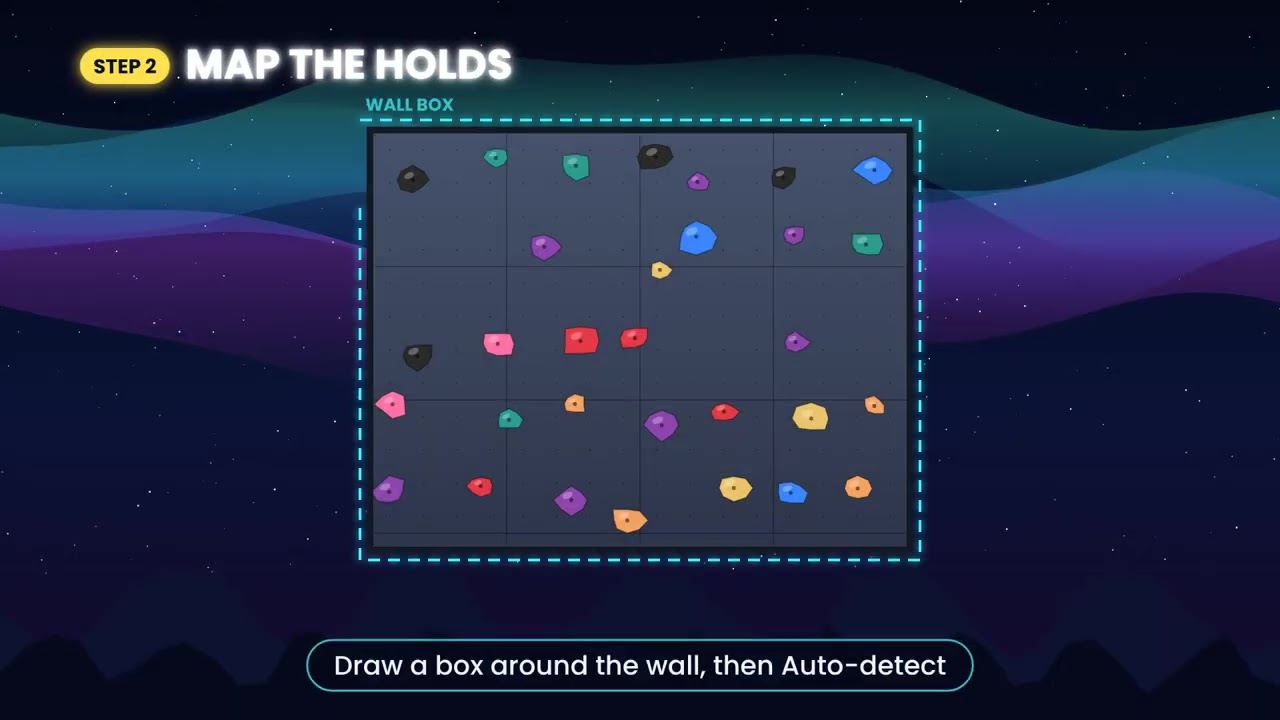
- Map the holds: drag a Wall box around the climbing wall, then click Auto-detect. The wall flashes white and every hold gets circled. Click a circle to delete an extra, click the wall to add a missed hold, drag to move, scroll to resize.
- Saved for next time: the calibration and hold map stay on that computer, so next class you just press Play.
How to play
- Start: the climber touches the green START hold to begin the 3-2-1 countdown.
- Sprint: touch as many holds as you can before the timer runs out (30, 45, 60 or 90 seconds).
- Race to 20: fastest to touch 20 holds.
- Traverse: the light keeps moving one direction and turns around at the edge of the wall. Count your laps.
- 2 climbers: split the wall left and right. Each climber chases their own colored light, head to head.
- Results: holds touched, average seconds per hold, holds per minute and best streak. Then it counts down for the next climber, ready for station rotation.
Settings for every age and ability
- Reach: Close, Medium or Far sets how far apart the next hold can be.
- Height: Full wall, Lower 75% or Lower 50% keeps the targets low for younger climbers or for practice without a spotter.
- Next hold: show a dashed preview of the hold after the current one so climbers can plan ahead, or keep it a surprise.
- Touch by: Hands, Hands + Feet, or Hands + Cover. Cover also counts a touch when the hold is blocked from the camera, which helps when the climber’s back is to the camera.
Setup tips
- Make the projection bigger than the wall. The extra space on each side becomes the scoreboard.
- Mount the projector high and a little off to the side so the climber’s shadow doesn’t cover the next hold, and aim it away from spotters and the waiting line.
- Keep some lights on so the webcam can see the climber.
- If the cart gets bumped, run Auto Calibrate again. Your hold map stays.
- Follow your normal climbing wall safety rules: spotters, mats and a height limit that fits your class.
Keys
| Key | What it does |
|---|---|
| Space | Start the round, skip the results, or test a touch |
| Enter | Test a touch for climber 2 |
| D | Debug view: shows where the game sees the climber’s hands |
| P | Show or hide the camera view |
| F | Full screen |
| Esc | Back to the menu |
What you need: a projector, a laptop or Chromebook with Chrome or Edge and a webcam, and a climbing or traverse wall. It’s a single file you open in the browser, with nothing to install. No camera? Click the glowing holds to try it out.
Part of the PlayWithMotion 5000 series by Project Play PE.