Throw at the right answer and beat the clock
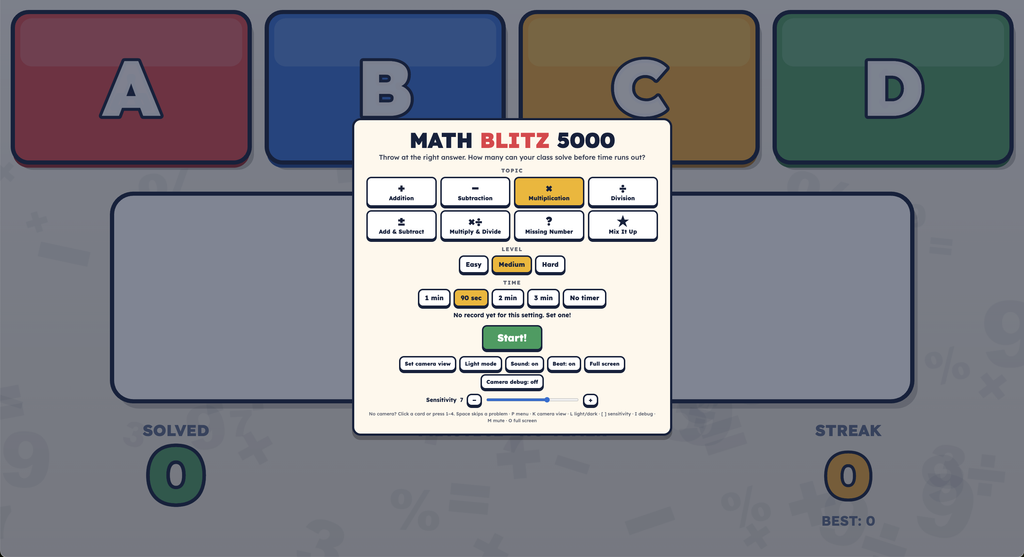
Four giant answer cards run across the top of the wall: red, blue, yellow and green. A math problem shows in huge type in the middle. Students throw a ball at the card with the right answer. Get it right and the card bursts, the answer fills in, and the next problem pops up. Miss and that card grays out with a big X, so the class keeps throwing until someone finds it. How many can your class solve before the timer runs out?
How to play
- Pick a topic, level and time in the menu, then press Start! A 3-2-1 countdown starts the round.
- Solve and throw. Hit the card with the right answer to score +1 and get the next problem.
- Wrong card? It grays out and the streak resets. The problem stays up until someone gets it.
- Streaks of 5, 10, 15 and more in a row get a big banner.
- Last 10 seconds: the clock turns red, ticks, and the beat speeds up.
- Results: your class’s total, accuracy and best streak. Beat your class record for that topic, level and time to get NEW CLASS RECORD!
Topics and levels
8 topics: Addition, Subtraction, Multiplication, Division, Add & Subtract, Multiply & Divide, Missing Number (like 8 + ? = 15) and Mix It Up.
3 levels: Easy, Medium and Hard. For example, multiplication goes from facts up to 5s, to facts up to 10s, to facts up to 12s. Round length: 1 minute, 90 seconds, 2 minutes, 3 minutes, or no timer for practice.
The wrong answers are believable: off by one, flipped digits (45 for 54) and neighboring facts (6 × 8 when the problem is 6 × 9). Students have to actually know it, not guess.
Setup tips
- Laptop and built-in webcam 15 to 20 feet from the wall. Any farther and the camera is too far to see the ball.
- Set the camera view from the menu: drag the four handles onto the four pink corners. Check it every so often in case the cart gets bumped.
- Keep some lights on. Light mode is the default, so students and the screen are both easy to see.
- Sensitivity around 7 is a good starting point.
- Only the answer cards at the top count, so students running and balls bouncing below them won’t trigger answers.
Keys
| Key | What it does |
|---|---|
| 1 to 4 | Answer a card (no camera needed). You can also click a card. |
| Space | Skip a problem |
| P | Menu and pause |
| K | Set camera view |
| L | Light or dark mode |
| [ and ] | Lower or raise sensitivity |
| M | Mute |
| O | Full screen |
What you need: a projector, a laptop or Chromebook with Chrome or Edge and a webcam, and soft balls. It’s a single file you open in the browser, with nothing to install. No extra sensors.
Part of the PlayWithMotion 5000 series by Project Play PE.