A Halloween kart race you run with your whole body
Pick your monster and race the haunted circuit! Players pump their arms to run, step left or right to steer, jump to hop, and throw both hands up to fire an item. Every lap is a real workout. The faster you pump, the faster your monster runs.
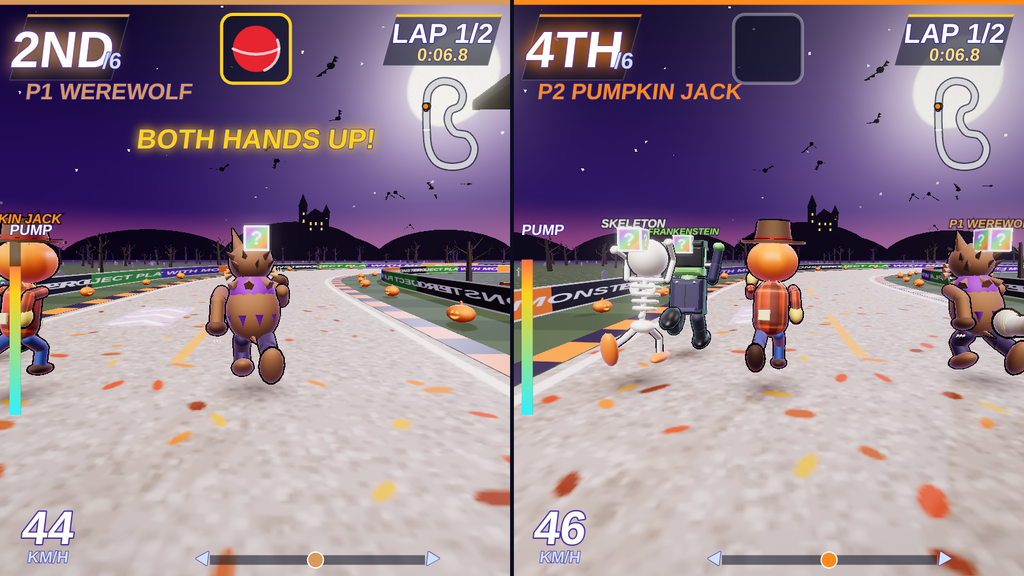
Best with 2 players. Each player gets their own split screen, side by side on the wall or TV. Computer racers fill the rest of the grid. Up to 4 players can race at once, but 2 gives each player the biggest screen and the cleanest tracking.
How to play
- Pump your arms to run. Harder pumping means more speed.
- Step left or right to steer around the turns.
- Jump to hop over a dodgeball coming your way.
- Put both hands up to use your item:
- Broom Boost: a burst of speed.
- Dodgeball: fired at the racer ahead.
- Pumpkin Drop: left on the track behind you.
- Hit the glowing ghost glide pads for a free boost.
Pick from 8 monsters: Frankenstein, Werewolf, Skeleton, Mummy, Vampire, Witch, Pumpkin Jack and Ghost.
Made for PE class
- Races of 1, 2, 3 or 5 laps. Use a 1-lap sprint for quick stations and 5 laps for endurance.
- An Arm pump setting makes top speed easy for little kids or harder for athletes.
- Easy, Medium and Hard settings change both the computer racers and how much the game helps with steering.
- Optional heart-rate boost: pair a Bluetooth heart-rate armband to a player in Chrome or Edge. When that player’s heart rate goes over the target (adjustable from 100 to 140 bpm), their monster runs up to 30% faster. The results screen shows each armband player’s average bpm, peak bpm and how much of the race they were boosted.
- Auto-restart keeps rotations moving with no teacher at the computer.
Three ways to set it up
- Projector + body tracking: project on a wall, with the camera beside the projector.
- Shadow mode: players race with their shadows on the projected wall.
- Front camera: put a webcam on top of the TV and race facing the screen. No calibration needed.
You can also use a phone as the camera. It connects with a 4-letter code.
Floor setup tip: mark each player’s zone
Tape the floor so every kid knows exactly where to stand:
- Tape a center line splitting the play area in half, front to back. P1 stands on the left and P2 on the right.
- Put an X in the middle of each side. That’s home base, where standing means running straight. Stepping toward the side line steers that way.
- Tape a start line where players stand, so the camera sees each kid from head to toe. With a front camera, this is usually 8–10 feet back from the TV.
- Keep kids in their own lane. The game tracks each player in their own zone, and lanes keep arms from tangling.
Press D during a race to see who the game is tracking. A colored P1 or P2 marker appears over each player.
What you need: a computer with Chrome or Edge, a webcam or phone, and a projector or TV. It’s a single file you open in the browser, with nothing to install.
Part of the PlayWithMotion 5000 series by Project Play PE.