Monster Dance Party 5000 — Guide &
Launch Game
What it is?
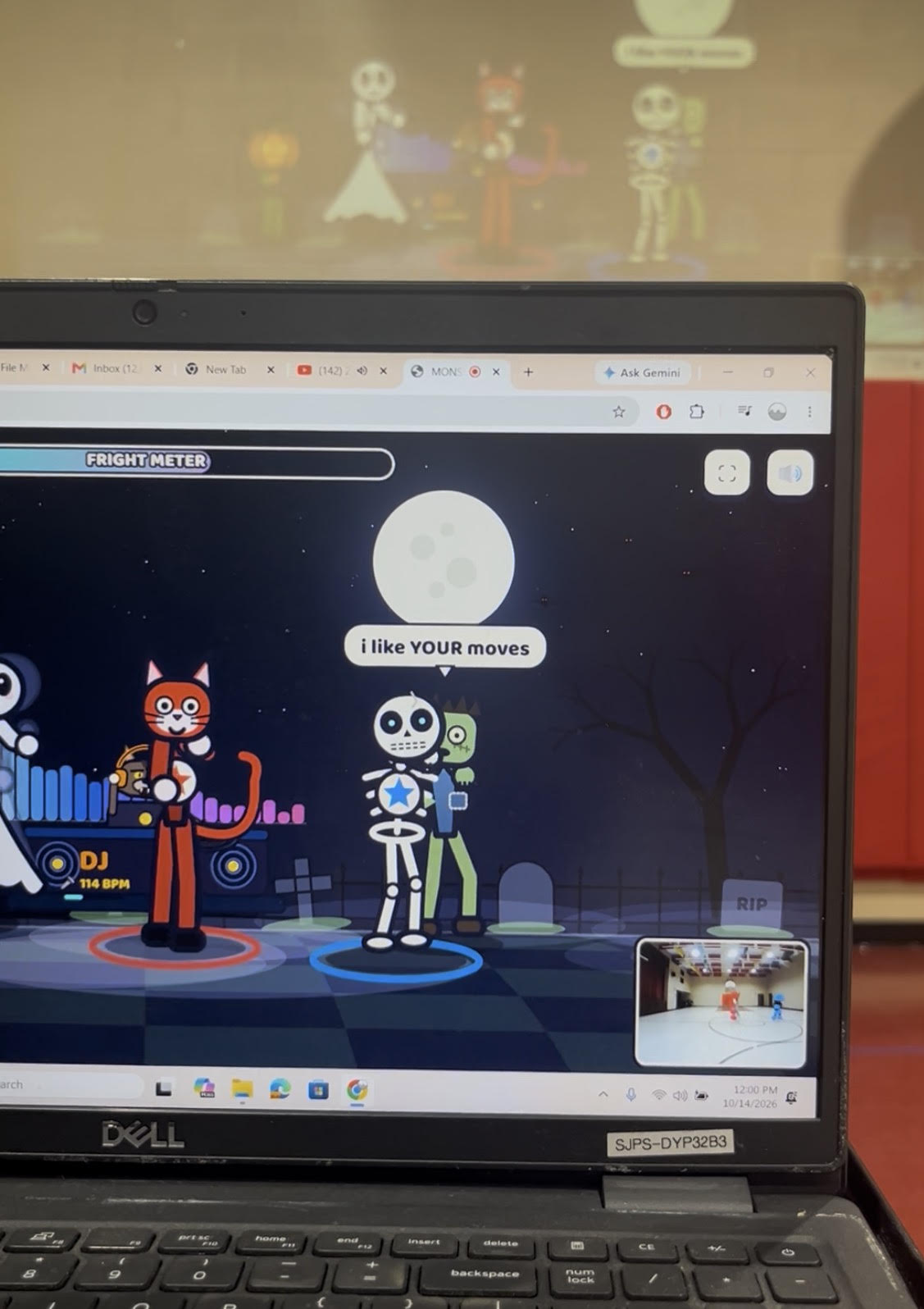
Monster Dance Party 5000 is a webcam dance game where kids invent the moves and a
crew of cartoon monsters copies them. It runs in a web browser with any webcam — no
controllers, no app, no account.
A pumpkin, a zombie, a ghost, a mummy, a vampire, a skeleton and a Frankenstein monster
dance on stage, each with its own personality. Hold a silly pose and the game names it
(“THE GOOEY CAULDRON!”) and the whole crew learns it. One or two dancers can play at
once.
How it’s different from a dance video game
In most dance games, kids copy the screen and get scored on how closely they match.
Here it’s flipped: the kid leads and the screen follows. There is no wrong move.
Typical dance game Monster Dance Party
Who makes the moves The game The kid
Who copies whom Kid copies the screen Monsters copy the kid
Scoring Accuracy, misses,
Effort and energy fill a shared meter
New moves A fixed routine per song
Kids invent moves; the game names
them and the crew learns them
Prompts “Do this step” “Dance like gravity disappeared” —
open-ended challenges
Every movement counts; the zombie is
always worse than them
Monster Dance Party 5000 — Guide & Launch Kit
Page 1 of 8
That makes it a creative movement tool, not just a cardio game. Kids practice rhythm,
body awareness and self-expression, and they get to be the choreographer.
Quick start
You need a laptop or Chromebook with a webcam, the Chrome browser, and speakers.
Setup takes about two minutes.
- Open the game link in Chrome. It must be opened from the website, not from a
downloaded file — the camera won’t start otherwise. - Pick your dance floor from the dropdown (Graveyard Bash, Pumpkin Patch, Haunted
Mansion and more). The floor changes every time the song changes anyway. - Pick your monsters. Tap PLAYER 1 and PLAYER 2 and choose a costume for each: cat,
witch, pumpkin, ghost, zombie, Frankenstein monster, mummy, vampire or skeleton. - Pick your music. Party Playlist plays the built-in songs. Your Own Music listens through
the microphone to any song you play from a phone or speaker and finds the beat. - Press START THE PARTY and click Allow when the browser asks for the camera (and
the microphone, if you chose Your Own Music). - Step back until the monsters can see you. The screen checks FACE, BODY and FEET;
when all three turn green, a 3-2-1 countdown starts. - Dance! A second player can step in or out at any time — no menus.
Controls: F = fullscreen · M = mute · [ and ] = change dance floor · click or tap the DJ’s
turntable = next song and a new floor.
What happens in the game
The monsters watch you and react the whole time; you never need to read instructions
mid-game.
The monster crew (more join as your party level goes up):
Monster How it dances
Jack the pumpkin Copies you, extra bouncy and hyper
Zombo the zombie Tries to copy you but is always late, sometimes
backwards, and freezes to “load”
Monster Dance Party 5000 — Guide & Launch Kit
Page 2 of 8
Invent a move. Hold any silly pose still for about a second. The game snaps a photo card,
gives the move a name, and the monsters perform it in a conga line. Later they bring your
moves back on their own.
Fright Meter → Monster Madness. Energy from both dancers fills one shared meter.
When it’s full, every monster copies you live for 12 seconds and points count double.
Party events pop up every 20–35 seconds:
FREEZE! — hold perfectly still (Bones usually falls over).
COPY CAT — Vampira strikes a pose; match it before time runs out.
SPOTLIGHT SOLO — one dancer’s moves count triple.
TWIN TIME (2 players) — strike the same pose together.
DJ Howl challenges. The werewolf DJ calls out open-ended prompts in the monsters’
voices, such as “Float like a ghost,” “Rattle your bones!” or “Invent a move no monster has
ever seen.” There’s no pass or fail — any movement counts.
Thriller Time. About every minute and a half the undead crew does a line dance together,
perfectly in sync — except Zombo, who is a beat and a half behind.
Level ups unlock new monsters, and at Level 6 a ghost puppy named Spooky joins the
party.
Ways to use it
The camera follows up to two dancers at a time; everyone else can dance along as the
backup crew.
Monster How it dances
Boo the ghost Copies you two seconds later, leaving ghost trails
Frankie Copies you but makes every move huge
Grandmummy Copies you in slow motion and falls asleep if the
room gets quiet
Vampira Does her own dramatic routines and runs Copy Cat
challenges
Bones the skeleton Copies you with rattly, wobbly bones and
sometimes trips
Monster Dance Party 5000 — Guide & Launch Kit
Page 3 of 8
Whole-class PE dance. Two leaders stand in the camera zone and invent moves; the
rest of the class copies the leaders, just like the monsters do. Swap leaders every song
(about 2–3 minutes).
Station rotation. Set it up as one station: two students dance per round while the next
pair waits on deck.
Brain break. One song in the classroom between lessons. Use DJ Howl’s challenges as
the prompt.
Creative movement unit. Kids design and name their own moves, then teach them to
classmates. The polaroid card names make great vocabulary for a class “move
museum.”
Rainy-day recess or indoor field day.
Family living room. Plug a laptop into the TV, pick costumes, and let siblings or a parent
and child play together.
Halloween parties. Put it on a big screen and rotate guests through the dance spot.
Use Your Own Music with your own Halloween playlist.
Classroom setup: camera, laptop, projector
Put the webcam right below the screen, facing a taped dance zone 8–12 feet away, and
keep the rest of the class to the sides, out of the camera’s view.
Monster Dance Party 5000 — Guide & Launch Kit
Page 4 of 8
- Screen. Project onto a wall or screen at the front of the room. A ceiling or short-throw
projector is best, so dancers don’t block the picture. A TV works too. - Laptop and webcam. Place the laptop on a cart centered just below the screen,
camera at about 3–4 feet high. Leaders look at the screen and the camera at the same
time. An external USB webcam on top of the screen works if the laptop has to sit
elsewhere. - Dance zone. Tape a box about 8 feet wide, 8–12 feet in front of the camera. Two leaders
stand inside it. Before starting, have them check that FACE, BODY and FEET all turn
green. - Backup crew. The rest of the class lines up in two groups on the left and right, facing
the screen and copying the leaders. Keep them out of the camera’s view, or the game
may follow the wrong dancer. - On deck. The next pair waits at the side and swaps in when the song changes.
classroom layout, top-down view
Monster Dance Party 5000 — Guide & Launch Kit
Page 5 of 8
- Sound and light. Plug in speakers — laptop speakers are too quiet for a gym. Light the
dancers from the front and avoid a bright window behind them.
Troubleshooting and privacy
Privacy: the camera image is processed inside the browser on your own computer to find
body positions. No video is recorded, saved or uploaded, and no account or student
information is needed. The microphone is only used in Your Own Music mode, to hear the
beat.